





Resource Capacity Planning
That Doesn’t Assume
Resource capacity planning designed around how people work. Not just how they are scheduled.
Resource capacity planning designed around how people work. Not just how they are scheduled.
Trusted by 850+ global enterprises across 29+ countries














Make better resourcing decisions. Keep your resources productive, not overwhelmed.
Plan smarter with real-time capacity data. Filter by skill, role, or team to find who has the capacity. Whether it’s next week or next quarter, resource capacity planning ensures the people with available capacity are assigned without spreadsheet guesswork.
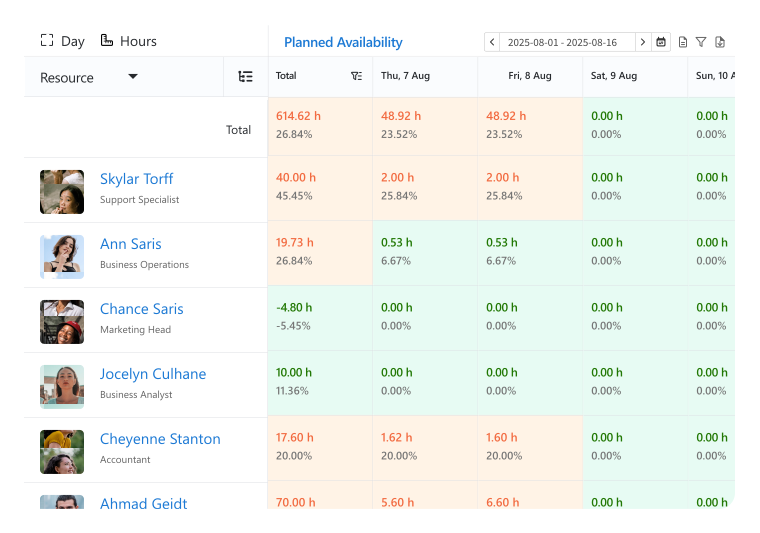
Busy? Booked? Barely assigned? Get the full picture. See who's swamped, who's cruising, and who’s got room to spare. Get a clear visual breakdown of resource assignments with resource capacity planning software, distribute workload efficiently, and avoid bottlenecks by rebalancing effort and reducing idle time.
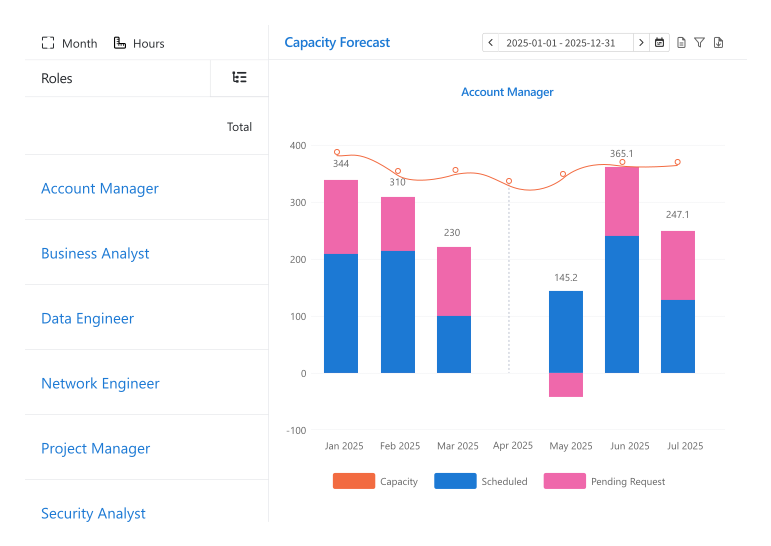
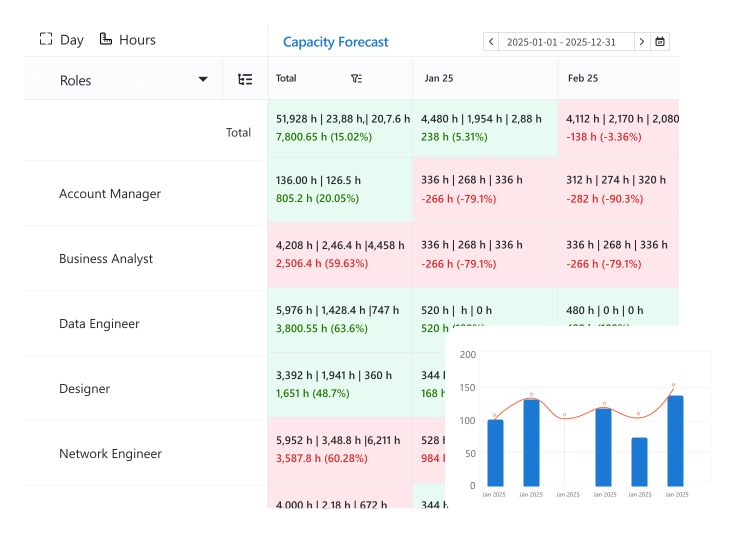
Don’t know where your resource requests are vanishing? eResource Scheduler helps you keep records. With the capacity forecasting reports, you can now track the pending requests and clock the capacity balance for specific roles. Reports are the live charter, so you can easily forecast future needs and maintain capacity.
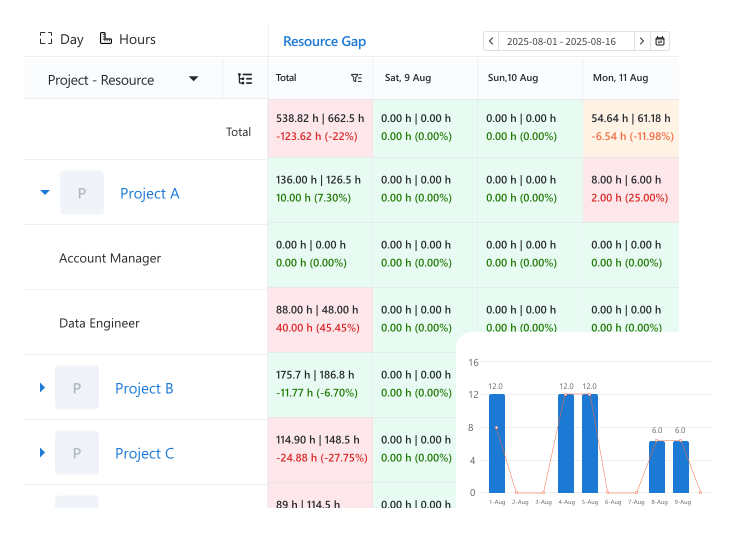
Too much work, too few hands? The system catches it before your team feels it. Resource capacity planning enables you to identify when resource allocations exceed available capacity and allows organizations to adjust schedules before overbooking results in missed deadlines.
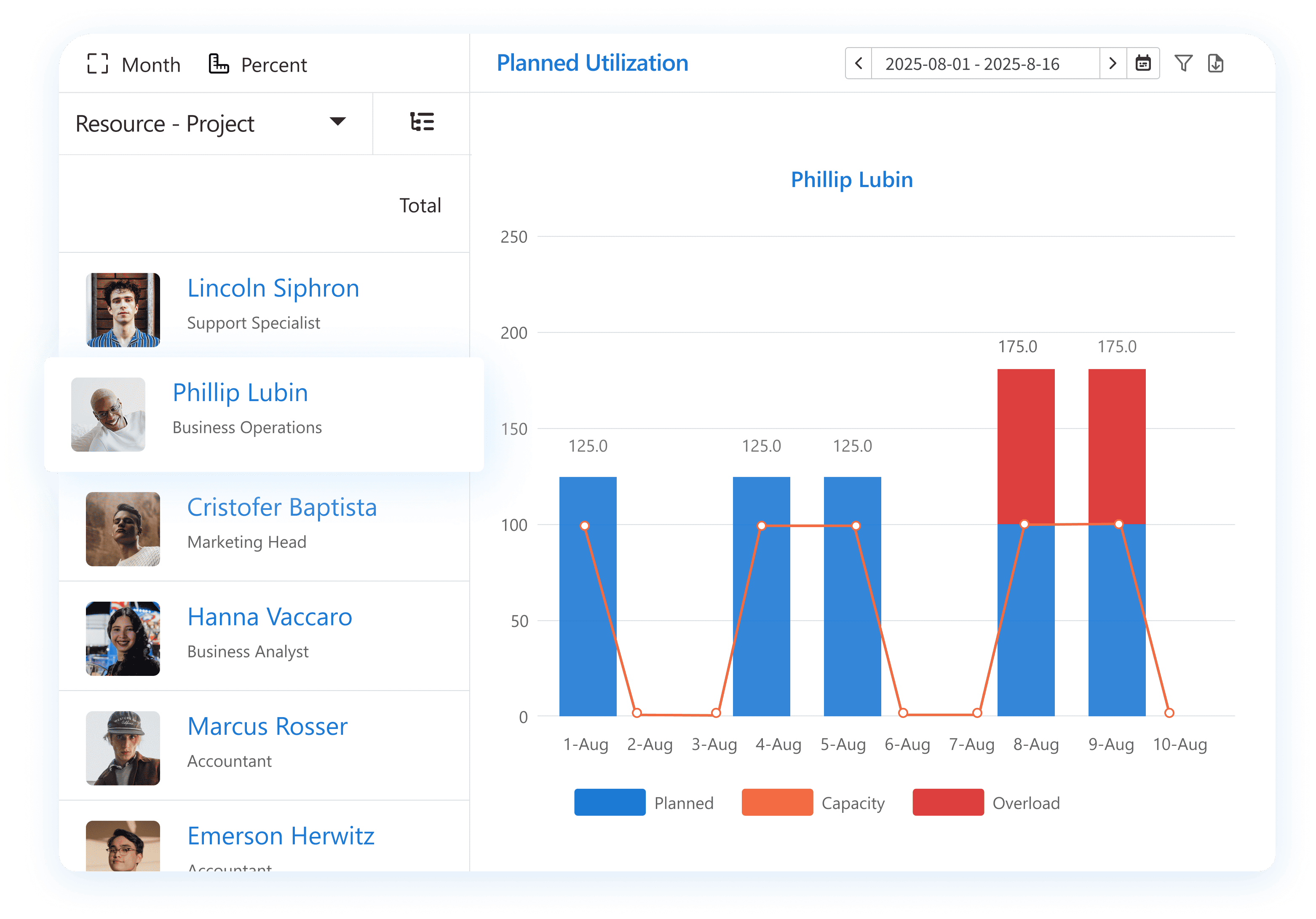
See what’s possible when scheduling meets eResource Scheduler.
Not everyone works 9 to 5. Define planned leave, reduced hours, or non-working days at the individual, team, or location level. Handle real-world workforce capacity planning, part-time, PTO, holidays, and reduced hours with precision. Plan with what’s actually available.
Track resource-based capacity, schedules, actuals, pending requests, and balances with our capacity forecast reports to know what you have and what you need for your hiring process.
Here’s how our capacity planning tool turns data into action:
eResource Scheduler's
Accounting & Audit Firms
Staff every audit with the right expertise, hit every filing deadline, and keep billable hours from slipping away.
Engineering
Match certified engineers to the right project phase, eliminate double-bookings, and deliver complex builds without the rework.
Construction & Architecture
Keep architects, contractors, and field crews
in sync across every site, every phase, and every deadline.
Management Consultancies
Keep consultants billable, bench time minimal, and every client engagement staffed with exactly the right expertise.
Information Technology
Balance sprints, support queues, and infrastructure work across your dev, QA, and ops teams without the conflict.
Professional Services
Whether it's law, advisory, or creative work, align the right talent to every brief and bill every hour with confidence.
Connect eResource Scheduler to your favorite apps and system, so your scheduling stays in sync without extra effort.


With eResource Scheduler, John Holland moved from reactive scheduling to proactive resource capacity planning. Centralized visibility across crews and equipment eliminated clashes, improved utilization, and aligned field teams with leadership. The result is stronger utilization, fewer surprises, and predictable delivery even across complex, multi-site infrastructure programs with consistent performance and accountability.
Read More
Capacity planning is figuring out how much work your team can handle and assigning resources accordingly. In a resource capacity planning context, it ensures the right people are available for the right tasks, prevents overload, and keeps projects on schedule.
Yes. In eResource Scheduler, overbooked resources are clearly marked with a red line on the scheduling chart. This visual cue helps managers instantly spot overloads, adjust allocations, and rebalance workloads before they impact timelines or team efficiency.
Color-coded heatmaps in eRS show at a glance which resources are free, partially booked, or fully booked. This visual feature of our workforce capacity planning software makes it effortless to balance workloads and plan projects without manually checking each schedule.
Yes. eRS lets you view resource capacity across multiple projects, identify over- or under-utilized team members, and reassign tasks accordingly. This ensures work is balanced, deadlines are met, and no one is overloaded.
Managers can forecast resource needs in a workforce capacity planning software like eRS by looking at upcoming project timelines, current workloads, and team availability. The system helps predict who will be needed when, making it easier to plan ahead and avoid bottlenecks.
In eRS, you can account for exceptions like vacations, training, or sick leave by marking them in the schedule. This ensures your resource capacity planning reflects actual availability and prevents overcommitting resources.
Capacity planning reports in eRS show where workloads exceed available resources. Managers can use this data to decide when to hire, reassign, or outsource, ensuring projects have the right team without overloading current staff.
Capacity planning is about understanding how much work your team can handle and preparing for future demand. Scheduling is about assigning specific tasks to people at specific times. A resource capacity planning tool like eRS helps bridge both, aligning future demand with day-to-day execution.
In eRS, you can quickly spot idle or underused resources with real-time dashboards and visual indicators. This feature in our workforce capacity planning software helps managers rebalance workloads and improve overall utilization.
Yes. eRS lets you see upcoming work alongside each team member’s available capacity. This capacity scheduling solution helps managers predict overloads, plan resources efficiently, and adjust assignments before projects fall behind.
 ALL FEATURES INCLUDED