Learn more
Be honest. Do you actually know what your team is working on right now? Not what the project tracker says. Not what came up in Friday’s status meeting. But what each person is genuinely doing. In what capacity are they working? Is it the right use of their time this week?
If the answer is ‘not entirely,’ you are not alone. Most remote managers operate with significant blind spots, not because they are bad managers. It is because the information that in-office environments deliver is delivered automatically. A glance at someone’s desk. A five-second hallway check-in. A read of the room during the meeting. These facilities simply do not exist in a distributed setup. You have to build systems to see them clearly.
That is what remote team management is at its core. The discipline of creating the visibility, structure, and trust that co-located environments generate by default. When these systems are working, remote teams do not just keep pace with in-office ones. They can even outperform them. Keeping remote employees engaged and motivated is one part of that system. This blog covers the rest.
60-Second Summary
Remote team management runs on one core principle. ‘You cannot manage what you cannot see.’ In remote teams, visibility is never the default mode. It has to be engineered.
The data reflects this. McKinsey & Company found that 87% of workers with flexible options choose remote or hybrid arrangements. Yet most management frameworks focus on an on-site mode. The result is a predictable gap. Teams that look productive on the surface but are quietly carrying hidden overloads, unresolved blockers, and disengagement. All these factors lead to attrition after a point.
The best remote managers do not work harder. They work smarter with better systems. Clearer expectations, fairer workload balance, and tools that surface the right information before small problems start costing you big money.

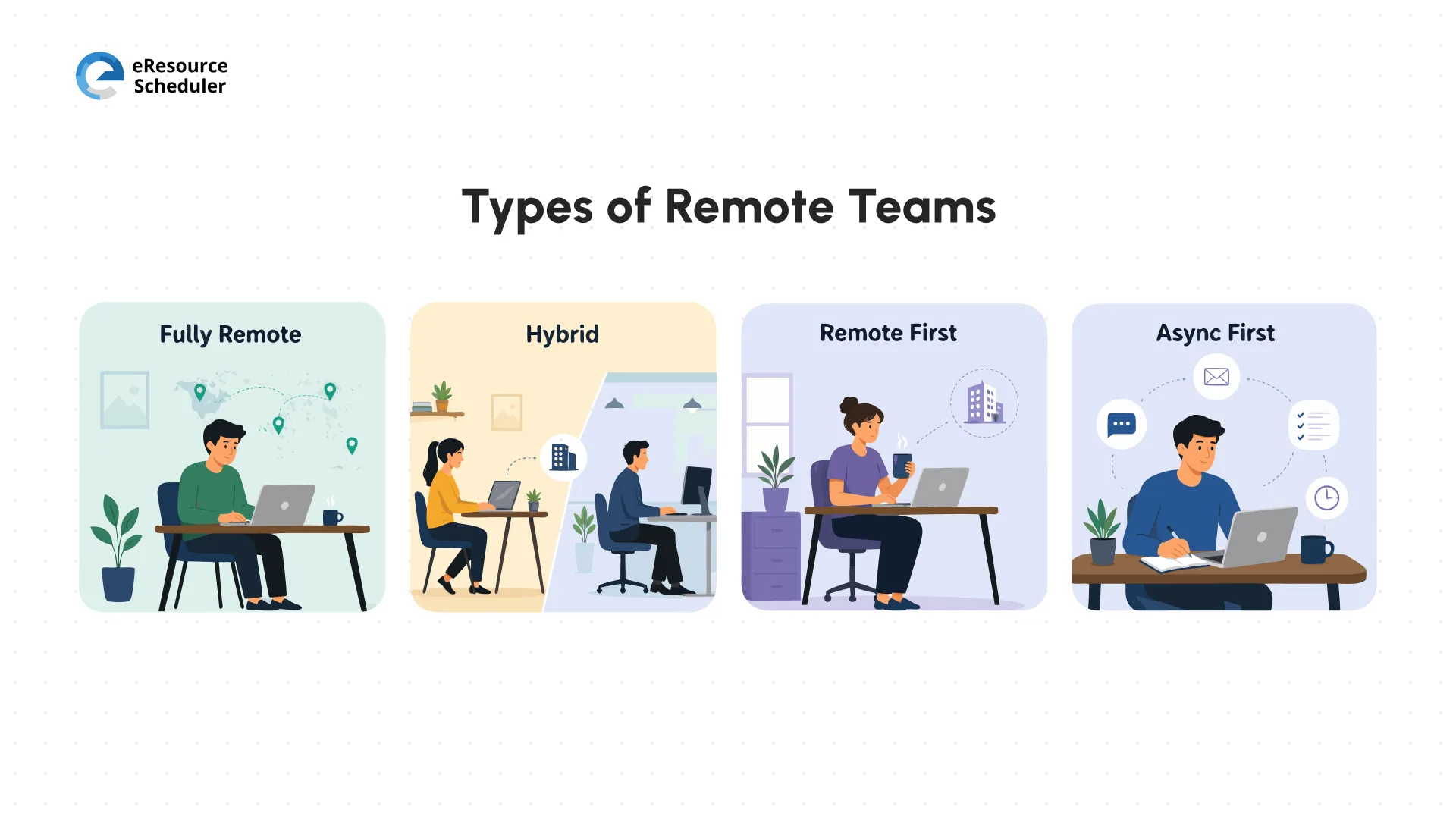
Remote team management means organizing, directing, and supporting a group of people who do not share a physical workspace. This includes four types of setups.
1. Fully remote: No central office. Everyone works from their chosen location. All coordination happens through digital tools and deliberate systems.
2. Hybrid: Some employees work from the office, some are remote. The split varies by day, role, or preference. This setup is the hardest to manage.
3. Remote first: The company standardizes remote as the primary operating model. Office access is optional. You are exempt from exceptions.
4. Async first: Work is structured around written, time-stamped communication. Live meetings are chemistry exceptions.
Now we know what remote team management is. So the next question, naturally, becomes, how is it different from in-office team management?
The difference between remote and in-office team management is about which systems you can take for granted and which ones you have to build from scratch.
| Aspect | In-Office Team Management | Remote Team Management |
| Communication | Spontaneous, verbal, real-time | Intentional async + sync; written clarity is non-negotiable |
| Supervision | Visual: mood is easy to read | Output-based; trust over surveillance; measured via KPIs |
| Collaboration | Whiteboards, drop-by desks, shared space | Structured check-ins, digital hubs, shared documentation |
| Culture Building | Organic via proximity and shared routines | Intentional; virtual rituals, explicit team norms |
| Onboarding | Shadow colleagues; informal on-the-go learning | Documented playbooks; buddy programs; 30/60/90-day plans |
| Performance | Activity visible in real time | Milestone-based; utilisation dashboards; outcome reviews |
| Tool Stack | Meeting rooms, shared drives, basic email | Full async stack: communication, video, PM, resource scheduling |
| Talent Access | Limited to the commute radius | Global: hire the best person, regardless of geography |
The benefits of managing remote teams well are real and measurable.
At the end of the day, these benefits are not for free. They require a management system that is built for distributed environments. Without it, the advantages quietly become liabilities.
Remote teams face challenges that goodwill and enthusiasm cannot paper over. Here are the eight challenges that come up most often.
1. Without visual cues, it is difficult to detect when someone is struggling or disengaging before it becomes a performance issue.
2. Information gets trapped in inboxes, direct messages, and personal drives. There are no accidental halfway conversations happening to gauge what people know.
3. A quick sync takes a week to schedule because time zone overlaps are rare. Many of these scheduling and coordination challenges across locations become worse without the right tool.
4. For many remote workers, the work-life boundaries are blurred. The same four walls are the office, gym, and kitchen. Context-switching is constant and often invisible.
5. Distributed devices, public Wi-fi, and home networks are real cybersecurity vulnerabilities without proper access controls in place.
6. Tracking productivity without micromanaging is nearly impossible. Activity tracking, Online status checks, and time logs tell next to nothing about meaningful work progress.
7. Research on remote team coordination published on Springer identifies social isolation as a leading cause of attrition in remote teams. A problem that compounds the longer it goes unnoticed.
8. New remote hires often spend weeks figuring out who they have to ask what and where things are before they can start doing productive work.
Run through these four questions once a week, honestly.
If any of the answers is making you uncomfortable, act on it. It is your agenda for the week. No special tool or framework is required for this step.
As Jason Fried and David Heinemeier Hansson put it in Remote: Office Not Required:
"Offices have become interruption factories. A busy office is like a food processor — it chops your day into tiny bits."
The goal of remote team management is not to rebuild that factory digitally with more Zoom calls standing in for hallway interruptions. It is to build something structurally better. When you do, the benefits become much clearer.
Knowing the challenges is half the work. The other half is building the habits that prevent them from taking root in the first place.
Schedule non-work moments. A virtual coffee slot. A no-agenda Friday catch-up. A Slack channel for off-topic conversations. Relationships built on trust are the foundational infrastructure of your team.
Trust is rebuilt in small moments. Every time you review the output, instead of the online status. Every time you respond to a delay with curiosity instead of surveillance and accusation. Burnout in remote teams is often invisible until it is a resignation letter. Lay the groundwork for one-on-one conversations. Start with ‘how are you?’ not ‘where are we on the project?’
Celebrate wins. A shoutout in the team channel, a personal note, or sometimes both, costs you nothing and builds goodwill.
Not everything needs a meeting. If a conversation requires immediate judgment or emotional nuance, schedule a call. If it is informational or feedback-based, default to async. Understanding why mobile-first planning reduces friction is essential to explore for distributed teams managing across multiple regions.
Communication policy plays a crucial role. Write down your team’s norms. Response time expectations. Tool usage and role. Define urgent. Then enforce this policy consistently. Document decisions in writing. Record meetings. Rotate meeting time. This makes sure the same region is not the sole bearer of all the responsibilities every time.
Define who is responsible for, accountable for, consulted, and informed for each project. When people know what they own and who makes the final call, ambiguity disappears.
Define what a successful week looks like for each role individually. Review performance against milestones and deliverables. Not logged hours or online presence.
Every team member should have the hardware, software, and connectivity to work at full capacity. Visibility into team priorities is a plus, so no one is waiting around for context.
Remote onboarding takes approximately 30 to 40% longer than in-office onboarding when teams have no structured plans. Without proximity, new hires cannot absorb through observation. They have to be taught explicitly.
Pre-boarding (before day 1): Send hardware, access credentials, and a pre-reading folder covering the org chart, team glossary, and key processes. Assign them a buddy.
First 30 Days: Daily 15-minute check-ins with the manager. Scheduled introductions to every key stakeholder.
Days 31 to 60: A first solo assignment with a clear scope and a named reviewer. Formal feedback is the backbone of progress.
Day 61 to 90: Full independent contribution. A retrospective on what worked in the onboarding process and what the new hire would change.
A resource management software shows you the live team capacity. You can slot new hires into appropriate workloads from day one, without overloading them or leaving them idle for weeks.
Why does eResource Scheduler go beyond project management?
Unlike task tools that show what is due, eResource Scheduler shows who has the capacity, skills, and availability to do it across your entire remote team in real time. Book a demo today and see for yourself.
Avoid tool sprawl.Most remote teams only need three to five well-integrated tools. More apps equal more context-switching. More context-switching equals less deep work. Audit your tool stack every quarter and cut anything with under 70% team adoption.
| Tool Category | What It Solves | Examples |
| Communication | Async messaging, quick Q&A without a meeting | Slack, MS Teams |
| Video Conferencing | Sync check-ins, async video walkthroughs | Zoom, Google Meet, Loom |
| Project Management | Task tracking, sprint boards, deadlines | Asana, Trello, ClickUp |
| Resource Management & Scheduling | Capacity planning, skill-based assignment, utilization tracking, timesheets, reports, etc. | eResource Scheduler, Resource Guru |
| Docs & Knowledge Base | Single source of truth for policies and playbooks | Notion, Confluence, Google Drive |
| HR & People Ops | Leave management, onboarding workflows, and compliance | BambooHR, Rippling |
| Security & Access | Protect data across distributed devices and networks | 1Password, Okta, NordLayer |
If you are unsure which tools deserve a spot in that stack, a category-by-category breakdown is worth working through before your next audit.
The biggest mistake in remote performance management is measuring activity. Activity metrics tell you someone was busy. KPIs tell you whether the work moved the business forward.
1. On-Time Delivery: How often projects hit deadlines without scope cuts.
2. Response SLA: Average time to respond to urgent internal or client requests.
3. Employee Satisfaction Score: Measured via pulse surveys, not annual reviews.
4. Task Completion Rate: Percentage of assigned tasks completed by their due date.
5. Resource Utilization: The percentage of each member’s capacity used productively.
6. Project Health Index: A composite of budget adherence, timeline accuracy, and quality.
For performance reviews, cadence matters as much as content. A resource management dashboard helps surface live utilization data across your team. You can catch overload or underuse before it becomes a performance problem.
Here is the part every manager needs to read but most skip.
Teams that instill in-office management frameworks for remote work without adapting them share a common outcome: Inconsistent performance and avoidable attrition.
Research into the evolution of virtual team management identifies the gap between the assumed and actual team capacity as the single greatest operational risk in remote work. Most teams discover this resource capacity gap only after a deadline has already been missed or a resource has reached the burnout stage.
This resource capacity gap is exactly what the eResource Scheduler is designed to close. Here is what gives remote team leads:
Global engineering firm Ramboll has 18,000+ professionals. Teams operate from Scandinavia to South Africa. Spreadsheets left capacity blind spots everywhere. Calendars clashed. Approvals stalled in email threads. eResource Scheduler replaced the guesswork. Every region worked from one shared view. Scheduling turned proactive, not reactive.
If you have ever ended a week unsure who had capacity and who was already overloaded, you know exactly what this clarity is worth.
Most remote management challenges get blamed on time zones, tools, or the lack of face-to-face time. Those are real constraints. But they are rarely the root cause.
The root cause is almost always a system designed for an office that was never rebuilt for a distributed team. No single leadership behavior drives virtual team effectiveness on its own. It is always a combination, and well-being is the floor your team cannot rise above until it is addressed.
Fried and Hansson challenged us to build something better than the interruption factory. Ramboll proved what that looks like in practice: not more meetings or check-ins, but a single shared view of capacity that lets managers act before problems surface.
That is the standard worth building toward. Not managing distance. Designing resource scheduling systems that make distance irrelevant.
1. How do you handle conflict or underperformance in a remote team?
In an office, small tensions are visible and diffuse informally. Remotely, they compound in silence. For underperformance, start with a private one-on-one that separates the person from the output. For conflicts between team members, move it to a video call before it becomes a thread of passive messages. Document agreed actions and timelines so accountability is shared and visible to both sides.
2. How often should distributed teams meet in person?
Two to four in-person gatherings per year are enough. The goal of an in-person meetup is not to do work that could have been done on a Zoom call. It is to invest in the relationships that make the rest of the year's async communication work better. Onboarding new hires in person, even briefly, also pays dividends that no amount of video onboarding fully matches.
3. How do you manage remote employees across multiple countries legally?
This is one of the most underestimated complex areas in remote team management. Employment law, tax obligations, contractor classification, and data privacy rules vary significantly by country. Misclassifying a full-time remote worker as a contractor is a compliance risk in most jurisdictions.
4. What are the early warning signs that your remote team management is not working?
The most reliable signal is quietness. When a previously engaged team member goes quiet across channels for more than a week, that is rarely a workload issue. It is almost always a trust or motivation problem that the management system failed to catch early enough.
5. What is the difference between managing remote employees and managing remote contractors?
The practical difference is that employees need cultural integration, career growth conversations, and genuine investment from their manager. Contractors need clear briefs, fast feedback loops, and timely payment. Treating one like the other is one of the most common and costly mismatches in distributed team management.


Plan Smarter. Schedule Faster. For Free.
Join thousands already using eResource Scheduler to align teams, time, and tasks seamlessly.
 ALL FEATURES INCLUDED