Learn more
You know that feeling when a big project lands on your desk and your first thought is, ‘Who on my team can actually handle this?’ This pause, right here, is the problem a capability map solves. Instead of guessing who’s ready for what, you get a clear picture of what your team can already do, where the gaps sit, and what you need to build next. It’s less about ticking a planning exercise off your list and more about giving yourself the visibility you need before you commit to growth. If you are already working with resource scheduling software, you’ve got a head start, since most of the data you need is probably sitting there already.
This piece walks you through what a capability map actually is, why it matters more for growth than most people realize, and how to build one step by step. But first…
A capability map is a structured view of what your organization or team can do, broken down by skill, function, or role. Think of it as a snapshot that answers one question clearly. What are we actually capable of right now?
It usually includes:
The point is not to create a static chart you file away. It is to give yourself a living reference you can pull up whenever you’re making a staffing, hiring, or planning decision.
Research Insight
Managing skills inventory continues to rank among the biggest process gaps organizations face today, with 65% of organizations citing inconsistently followed processes as the top inhibitor to effective resource management. If your own capability data feels unreliable or outdated, you’re far from alone.
This stat alone tells you something important. Most organizations aren’t short on data. They’re short on a reliable way to organize and trust it. A capability map is one of the more direct ways to fix this.
People often confuse a capability map with a capability framework. So it is worth pulling these apart before we go any further.
| Capability Map | Capability Mapping Framework | |
| Purpose | Shows what capabilities exist right now | Defines what capabilities should look like at each level |
| Structure | Visual, often grouped by team or function | Descriptive, often written as standards or competency levels |
| Best used for | Spotting gaps and overlaps quickly | Setting expectations for hiring, training, and promotion |
You’ll usually build the map first, then lean on a framework to decide what ‘good’ looks like for each capability you’ve identified.
Once you’ve got a handle on what a capability map actually shows you, the next question is why it’s worth the effort beyond just having a tidy chart.
A capability map isn’t just an internal reference document. Done well, it directly shapes how confidently you can grow.
Before you take on a new client vertical or expand into a new service line, you need to know if your team can actually support it. A capability map tells you this upfront. Instead of you finding out three weeks into a project that nobody on your bench has the depth you assumed they had. Teams that get this right tend to think about resourcing the same way they think about broader resource strategy, planning capacity ahead of demand rather than scrambling to react to it.
Every hiring or training budget is limited, so where you put it matters. A capability map shows you exactly which gaps are costing you the most opportunities, so your next hire or training investment goes toward the skill that unblocks the most growth. Not just the loudest complaint in your last team meeting.
Restructuring, mergers, or shifting to a more cross-functional model all require knowing what you’re working with. Without a capability map, these transitions run on assumptions. With one, you know exactly which teams can absorb change smoothly and which ones need support first.
Once you see how directly this connects to growth, building one stops feeling like busywork and starts feeling like a genuinely useful investment of your time.
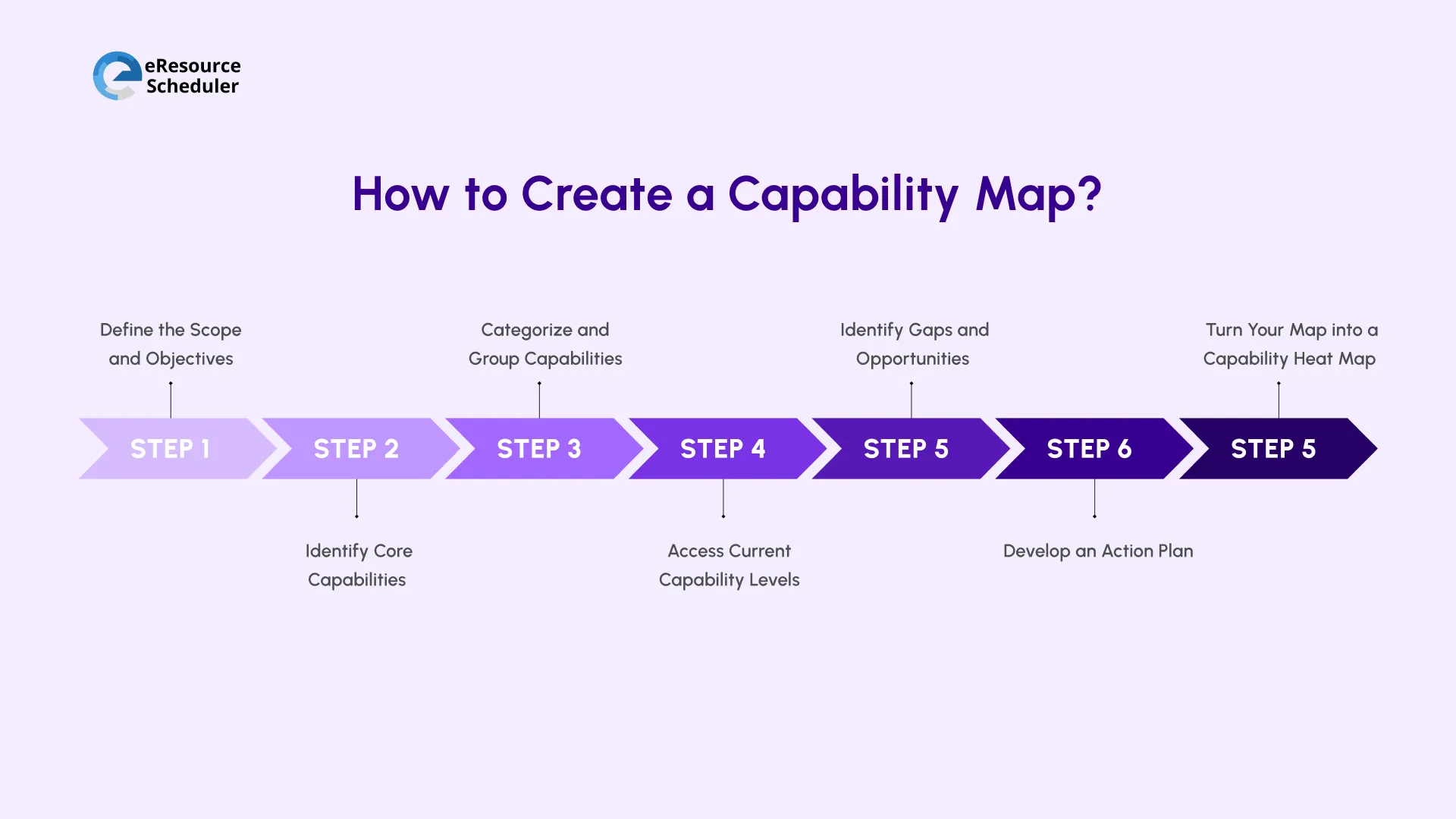
Here is how to actually put one together. Step by step.
Start narrow. Decide whether you are mapping a single department, a single project type, or the entire organization. Because trying to map everything at once usually means you finish nothing. Get clear on why you are building this map. Are you preparing for a new client, a restructure, or just trying to fix a recurring staffing headache?
If your scope centers on a specific initiative, define it in terms of your active projectworkstreams, since this keeps the exercise tied to real, ongoing work rather than an abstract org chart.
List out the specific skills, functions, or competencies relevant to your scope and push past the obvious ones. ‘Project management’ is too broad. ‘Agile sprint planning,’ ‘client escalation handling,’ or ‘vendor negotiation’ gives you something you can actually assess and act on.
Pull inputs from the team lead here, not just assumptions. They’ll catch capabilities you’d otherwise miss entirely.
Group your list into logical clusters. Technical skills, leadership skills, domain expertise, and client-facing skills. Whatever makes sense for your organization. This step is essentially where you start building a working skills inventory. Just organized visually instead of as a flat list.
Good grouping also makes gaps easier to spot later. You’ll notice entire clusters that are thin before you notice individual missing skills.
Rate each capability, usually, on a simple scale like beginner (rookie), competent (adept), and expert (pro). Be honest here. Inflated ratings defeat the entire purpose of this exercise. Where possible, rate at the individual level first. Then roll it up to a team view.
This way, you just don’t know your team has a skill. You know exactly who owns it and how deep that ownership actually goes.
Pro Tip
Reassess capability levels on a fixed cadence. Ideally, every two quarters rather than once and never again. Skills shift faster than most people expect, especially on teams that rotate across projects.
Once you’ve rated everything, the gaps usually jump out on their own. Look for low-rated capabilities that keep showing up in your project demand. Those are costing you the most right now.
Also, flag capabilities where you are overly reliant on one or two people. This is a gap, too. Even if the skill itself is rated high
Turn each gap into a concrete next step. Hire, train, or reassign. Attach a realistic timeline to it. This is usually where resource managers get involved directly. They are the ones who translate capability gaps into day-to-day staffing decisions.
Assign an owner to each action so it doesn’t quietly disappear into a backlog. Since gaps without an owner sit untouched for months.
A capability map only works if people actually look at it. So make it visual. Use color coding for proficiency levels. Grouped view for the team to sort. Heat maps to spot discrepancies. Simple grids to make the data readable at a glance. This is really an extension of good visual planning practice, since the goal is the same. Make complex information something a manager can scan in ten seconds. Not ten minutes.
With the map built, the next question is how to keep it accurate without redoing this exercise manually every quarter.
Building your first capability map in a spreadsheet is fine. Keeping it accurate over time in a spreadsheet is where most teams struggle. Roles change, people move between projects, and skills develop. But static documents don’t update themselves.
Wellingtone’s 2026 State of Project Management report found that a notable share of organizations still rely on Microsoft Excel for planning. A further 11% use no dedicated project/resource management solution at all. This tracks with why so many capability maps go stale within a few months of being built.
If you are deciding whether it’s time to move beyond manual tracking, here is what actually matters.
| What to Look For | Why It Matters |
| Real-Time Updates | Reflects role and skill changes as they happen, not on a quarterly refresh |
| Skill-Level Tracking | Shows proficiency depth, not just who's assigned where |
| Integration | Connects capability visibility to actual staffing decisions |
| Visualization | Makes gaps and overlaps readable at a glance across teams |
| Ease of Updating | Keeps the map useful as the organization changes, instead of going stale |
Capability data becomes far more useful once it is connected to the same system you use for day-to-day scheduling and allocation. Rather than living in a separate document nobody remembers to update. This is the direction most resource scheduling software, like eResource Scheduler, has been heading. Fewer disconnected trackers, more unified visibility.
Building a capability map isn’t about producing a one-time chart to show leadership you’ve ‘done the exercise.’ It is about giving yourself a decision-making tool you’ll actually return to. To know whether your team is genuinely ready to take on a new client vertical.
The organizations that get real value out of this aren’t the ones with the most polished map. They’re the ones who treat it as a living reference. Revisiting it on a set cadence, updating as roles and skills shift, and letting it quietly form decisions instead of sitting in a folder no one opens after the initial rollout. This is really the difference between a capability map that supports growth and one that just documents where you stood on the day you built it.
Start small if you need to. Map one team or one project type first, get into the habit of updating it regularly, and expand from there. The goal isn’t a perfect map on day one. It is a map you trust enough to act on. The one that grows more useful every time you revisit it.
1. How long does it usually take to build a capability map for the first time?
For a single team or department, you can usually get a working first draft done in a week or two; most of that time goes into gathering honest input from team leads, not the mapping itself. Mapping an entire organization at once is a different story and can take a couple of months if you're doing it properly. That's exactly why Step 1 pushes you to narrow your scope before you start.
2. Who should actually own the capability map once it's built?
Ownership works best when it sits with whoever's closest to staffing decisions day to day, usually a resource manager or a department lead, rather than being handed entirely to HR. HR can help standardize the rating scale and keep things consistent across teams, but the person updating and using the map should be the one making the calls it's meant to inform.
3. What's the difference between a capability map and a skills matrix?
A skills matrix is typically a flat list showing which individuals have which skills, often just a checkbox or basic rating per person. A capability map goes a level higher. It groups those individual skills into broader capabilities and shows you strengths and gaps at a team or organizational level, not just an individual one. You'll often build a skills matrix first and use it as a raw input into your capability map.
4. What's the most common mistake teams make when building their first capability map?
Rating capabilities too generously. It's tempting to mark a skill as "strong" because one person on the team happens to be excellent at it, without accounting for how thin that expertise actually is if that one person leaves or gets pulled onto another project. A capability that depends entirely on one person isn't a strength yet; it's a risk waiting to surface.
5. Does capability mapping make sense for small teams, or is it mainly useful for large enterprises?
It's arguably more useful for small teams, not less. Larger organizations can absorb a capability gap for a while without it being obvious. On a small team, one missing skill can stall an entire project immediately. The exercise scales down easily, too; a five-person team can map its capabilities on a single page and still get real value from it.



Plan Smarter. Schedule Faster. For Free.
Join thousands already using eResource Scheduler to align teams, time, and tasks seamlessly.
 ALL FEATURES INCLUDED