The 25 Best Resource Management Software Options To Try In 2026
Resource challenges are not a future problem. Teams that still react to fires lose time and profit. These
challenges
are the day-to-day reality for leaders trying to hit targets while managing hybrid teams and constrained
budgets.
Picking the right resource management software is a lot
easier when the best options are laid out clearly. Teams move
fast. Priorities keep shifting. Leaders just want tools that make planning people and workloads feel simple
instead
of chaotic.
Consider this article your shortcut to finding software that helps teams stay organized, avoid
last-minute scrambles, and work with more breathing room. If the goal is smoother resource management and
better
visibility, these are the software worth exploring.
How To Evaluate The Best Resource Management
Software
Choosing the right tool becomes simpler when you know what actually matters. The strongest resource
management tools
today focus on clarity, accuracy, and smooth day-to-day planning. The goal is to help teams work smarter
without
adding more admin work.
Here’s what sets standout platforms apart.
Visibility and forecasting
Leaders want a clear view of who is doing what and what is coming next. Modern tools handle this with:
- Live resource visibility that updates as plans change
- Forecasts that show upcoming demand and potential bottlenecks
- Resource scheduling software features that keep timelines realistic
Allocation and utilization
Smooth resource allocation is the backbone of any planning
process. High-performing tools make it simple to:
- Spot overbooking early
- Reassign work with minimal disruption
- Track resource utilization so teams stay balanced and productive
Capacity planning
Capacity planning became a must-have. Teams rely on:
- Resource capacity planning dashboards for an accurate future workload view
- Skill-based mapping to avoid misallocation
- Quick scenario checks to understand how changes affect overall capacity
Financial tracking and reporting
Business leaders want the numbers to be as clear as the schedules. The best software supports:
- Cost and rate-based planning
- Project-level budget checks
- Reports that make conversations with finance easier
Questions buyers are asking
Buyers want tools that solve real issues, not add new ones. The questions have shifted to:
- Does this integrate cleanly with our existing stack?
- Can it support hybrid and global teams without creating chaos?
- Does it improve decision speed?
- Will it scale as we grow into 2026?
This list brings together 25 best resource management software that handle scheduling,
tracking, and day-to-day resource coordination without the usual friction. Every pick has been tested by
product specialists who spend their days inside real teams and real projects, so the recommendations
actually reflect how these tools behave under pressure.
The 25 Best Resource Management Software
Every platform here has its own strengths. Some shine in capacity planning, others lead in resource
scheduling, and a
few are built for teams that need deep utilization tracking
without the heavy learning curve.
Instead of overwhelming you with features, the list highlights what actually matters in day-to-day use. Use
it as a quick way
to compare options and spot the ones that match your workflows and growth plans.
1. eResource Scheduler - Enterprise resource management software
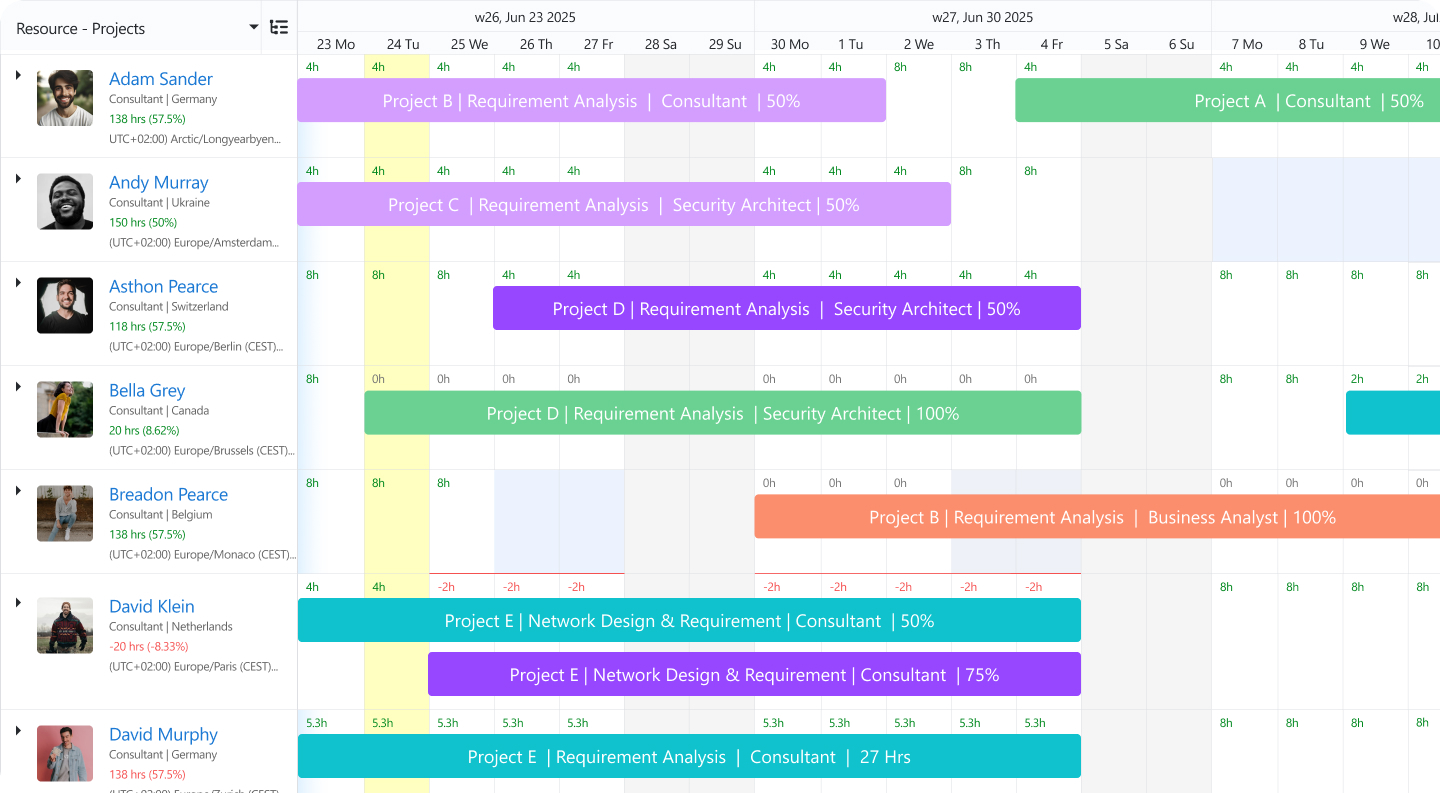
eResource Scheduler is one of the best
resource management software built to give teams clear visibility and help
organizations plan capacity, schedule projects, forecast workloads, boost margins, and track resource
utilization across teams.eRS is essentially enterprise resource management and scheduling software that
pairs resource scheduling with timesheets, financial reports, and management reports to help organizations
operate seamlessly.
Key features
- Drag-and-drop scheduling and role-based access and filters for resources, roles, and
time tracking and financials.
- Utilization dashboards and heatmaps to monitor who’s overloaded or underused at a
glance.
- Capacity planning and workload forecasting to anticipate future project demand.
- Financial tracking and reporting help link resource usage to cost and budget metrics to
help stay on margin.
- Utilization dashboards to see who is busy, who is free, and who is overloaded, paired
with heatmaps for a simple visual view of workload across teams.
Conflict detection to avoid double booking or overlapping assignments.
What stands out (why eRS leads here)
- eResource Scheduler gives complete visibility and clarity. No more guessing who’s
available, where capacity is blocked, or when a team is overbooked.
- Its simplicity plus depth with drag-and-drop + heatmaps + forecasting + finances, works
whether you run a small team or a large enterprise.
- It bridges resource, time, and budget in one place, helping leaders make decisions
based on utilization and cost, not just timelines.
- Helps teams move from reactive firefighting to planned, predictable, efficient
delivery, a must in a margin-conscious, hybrid-team world.
Cons
- Some teams might struggle once growth accelerates. If you don’t adopt eResource Scheduler early,
you risk falling back into spreadsheets and chaos.
- Without proper discipline, even with eResource Scheduler, you could still get overloaded because only
those serious about planning will get the full benefit.
- Teams accustomed to ad-hoc assignments might find structured scheduling constraining.
- If you skip setting up utilization and capacity norms, the dashboards may look clean but won’t
reflect reality.
Pricing: eResource Scheduler follows a module-based pricing
model, starting at $5 per resource per month. This allows teams to pay only for what
they need while scaling usage as operations grow. A free trial and demo are available, making it easy to
evaluate the platform before committing.
2. Smartsheet (with Resource-Management module)
Smartsheet brings spreadsheet power plus resource scheduling and portfolio-level capacity planning. Works
well when
you want flexibility and enterprise-scale control.
Key features
- Portfolio-level capacity heatmaps and demand vs capacity scenario planning.
- Searchable resource allocation: match people by role, skill, or billing rate.
- Customizable dashboards and reports with utilization, budget vs actual spend, and resource load.
- Integration with broader project planning workflows (tasks, timelines, dependencies), not just resource
tracking.
Cons
- Learning curve is steep, especially if the resource management module is used standalone. Some setup and
data
maintenance required.
- Outside the Smartsheet ecosystem, it loses some of its value. Integrations and broader workflow support
are
weaker.
- For fast-moving or agile teams requiring frequent re-allocation, the spreadsheet-style model can feel
rigid and
slow.
- Automation and reporting capabilities are tied to higher-tier plans; smaller teams or limited-budget
orgs may
find this restrictive.
GoodDay offers a combination of resource and project management environments. It’s useful for teams that want
collaboration, scheduling, task
tracking, and resource planning under one roof.
Key features
- Combined project management + resource scheduling + collaboration tools.
- Multi-view visualization (lists, calendars, boards) to suit different working styles.
- Workflow automation to simplify repetitive tasks across resources and projects.
- Resource availability tracking and utilization monitoring.
Cons
- Feature richness can feel overwhelming because resource data gets buried under task settings, workflow
rules and
project configurations, which slows onboarding.
- Reporting is broad but lacks deeper resourcing analytics, such as long-term capacity modeling or
skill-based
forecasting, which many teams eventually need.
- Resource allocation stays tied closely to task structures, which limits flexibility for managers who
want to
plan by role, placeholder or tentative booking.
- Customization options can lead to inconsistent setups across teams, which creates fragmented visibility
unless
everything is centrally governed.
Triskell brings together PPM, resource management, and capacity planning to help PMOs balance people, workloads, and business priorities across complex portfolios. A strong fit for organizations that need strategic visibility and tighter control over resource allocation.
Key features
- Portfolio-level capacity planning to match resource supply with project demand and forecast future needs.
- Scenario simulation to model changes in project scope, resource availability, and portfolio priorities before making decisions.
- Multi-project allocation with centralized resource data, role-based planning, Gantt charts, Scrum boards, and real-time usage tracking.
- Custom dashboards, timesheets, and reports to monitor utilization, KPIs, approvals, and resource performance across portfolios.
Cons
- More comprehensive than lightweight scheduling tools, so smaller teams with basic planning needs may find it more than they require.
- Requires clean resource, project, and portfolio data to get full value from capacity planning and scenario simulations.
- Implementation may involve PMO process alignment, especially for organizations managing multiple portfolios or business units.
- Because it is highly configurable, teams may need admin ownership to keep workflows, dashboards, and reports standardized.
5. Kantata (formerly Mavenlink)
Kantata is a professional services resource and project-management suite. It merges resource planning with financials, collaboration, and business intelligence, a fit for agencies and consultancies juggling multiple clients.
Key features
- Unified resource, project and budget tracking in one platform.
- Resource allocation based on skills, roles or availability.
- Financial visibility, like cost tracking, billing rates, and profitability per project or resource.
- Reporting and BI dashboards to support service-based business decisions.
Cons
- Interface can be cumbersome. Scheduling or allocation may require multiple clicks and feel less fluid compared to simpler tools.
- Overkill for small teams or simple projects. Complexity and steep learning curve can outweigh value for small/mid teams.
- Customization is limited. Some users cite challenges with export, reporting flexibility, or adapting to niche workflows.
- Regular use and commitment are required. Without consistent data input (timesheets, availability, booking), the dashboards won’t reflect reality.
This tool adds workload management and resource planning to its project management ecosystem. Fits large cross-functional teams.
Key features
- Workload charts to spot overloads early.
- Job-role based planning for large teams.
- Custom dashboards and automated reports.
- Time tracking is built into tasks.
Cons
- Complex permissions and workspace setup create friction for clean resource planning unless teams have admin expertise.
- Heavy interface leads to slower adoption for non-technical users so actual resource utilization data may stay incomplete.
- Forecasting is high-level and still not ideal for long-range, multi-project capacity models.
- Integrations require additional configuration and often professional services for enterprise-grade deployment.
Asana supports lightweight resource planning through Workload and Timeline views. Ideal for teams who value simplicity more than deep analytics.
Key features
- Workload charts across projects.
- Easy drag-resize effort hours.
- Visual timeline to map initiatives.
- Integrates with Asana’s automation rules.
Cons
- Resource features feel thin for service-based teams needing forecasting, availability insights, or billable utilization tracking.
- Capacity management hinges on manually entering effort hours, which can quickly become inaccurate if not updated regularly.
- Works better for task management than operational planning, so resource insights stop at the tactical level.
- Larger teams often end up needing a dedicated resource tool because Asana falls short on advanced analytics.
GanttPRO focuses on Gantt charts, project timelines, and high-level resource workload planning.
Key features
- Gantt planning with dependencies.
- Workload view per person or role.
- Task prioritization tools.
- Prebuilt templates.
Cons
- Resource management is basic and mostly task-driven, so there’s little depth for teams needing skill-based or long-term planning.
- Forecasting remains shallow because capacity data doesn’t extend beyond current schedules.
- Collaboration tools feel limited compared to modern PM platforms, leading to scattered resource discussions.
- May require separate tools for time tracking, billing, or financial visibility.
9. Tempo (for Jira)
Tempo extends Jira with resource and capacity planning features for engineering and IT teams.
Key features
- Capacity charts by sprint or release.
- The allocation tool is directly inside Jira issues.
- Real-time sync with Tempo Timesheets.
- Simple utilization insights.
Cons
- Works best only for teams living fully inside Jira. Outside that context, resource visibility becomes fragmented.
- Planning is constrained by Jira’s issue hierarchy, which doesn’t always match staffing or operational requirements.
- Advanced forecasting or multi-team capacity planning is limited without stacking multiple Tempo products.
- Reporting becomes rigid because Jira structures aren’t built for fluid resource modeling.
Microsoft Project remains a classic enterprise tool with powerful scheduling, dependencies, and resource charts.
Key features
- Advanced Gantt chart engine.
- Resource sheets and allocation views.
- Baseline comparison and cost tracking.
- Works with the Microsoft ecosystem.
Cons
- Steep learning curve and reliance on complex scheduling concepts makes adoption challenging for modern agile teams.
- Not built for real-time collaboration unless paired with Project Online or enterprise licenses, which raises cost significantly.
- Limited visibility for hybrid or distributed teams because updates often remain siloed in project files.
- Doesn’t provide flexible modern interfaces or mobile experiences compared to newer cloud tools.
Designed for client-service teams, Teamwork blends project management with workload and billable planning.
Key features
- Workload planner with drag-assign.
- Billing and time logs tied to roles.
- Utilization reports for agencies.
- Client management built in.
Cons
- Resource planning is tightly tied to tasks which creates friction when teams want skill-based or
tentative
planning.
- Reports become inconsistent if teams multitask across many projects or don’t track time with discipline.
- Financial tools are basic compared to dedicated PSA systems, which limit profitability forecasting.
- Customization for large teams is still limited to roles, availability rules, and complex rate cards.
Float is focused on visual scheduling and capacity planning. Great for teams needing fast, intuitive views of
who’s
booked, who’s free, and how workloads stack up over time.
Key features
- Visual calendar and timeline views for team scheduling.
- Capacity heatmaps to help forecast team availability and avoid overbooking.
- Integration with common tools (calendars, communication apps) for smooth workflow.
- Basic utilization tracking to help monitor time allocation across projects.
Cons
- Doesn’t offer full enterprise-level project management or deep resource analytics. Mainly focused on
scheduling
and time management.
- Lacks advanced capacity-forecasting features for very complex organizations or long-term portfolio
planning.
- Overbooking detection can sometimes be minimal when many overlapping projects exist, especially in
fast-changing
environments.
- For teams needing tight integration with broader project workflows or financial systems, Float may feel
too
lightweight.
Hub Planner is a scheduling-first resource tool with strong visibility for agencies and studios.
Key features
- Visual scheduler with drag-and-drop.
- Timesheets and approval workflows.
- Project budgeting controls.
- Heatmaps for availability.
Cons
- Interface becomes crowded for large resource pools, which slows down allocation and creates visual
overload.
- Requires ongoing manual cleanup for placeholders, booking types, and availability settings to keep data
truthful.
- Reporting offers breadth but lacks deeper customization for teams needing portfolio-level insights.
- Permission control can feel restrictive when multiple managers collaborate on shared resources.
Resource Guru is a no-frills scheduler built for quick, intuitive assignment of people or equipment across
projects.
It’s ideal when you want clean visibility without complexity.
Key features
- Simple, calendar-based resource scheduling.
- Workload heatmaps and availability overview to avoid clashes.
- Basic capacity and availability forecasting.
- Integrations with calendars and tools like Slack/Teams to sync availability.
Cons
- Doesn’t offer advanced resource analytics or financial tracking. Planning stays surface-level.
- Lacks robust integration with project management, time-tracking, or accounting software. May leave gaps
for
larger or complex projects.
- Reporting capabilities are basic, so forecasting resource demand or profitability is limited.
As teams grow, limitations around scaling (roles, complex allocations, multi-project resource juggling)
become more
obvious.
ClickTime is a time-tracking and capacity planning tool built for financial
accuracy in service teams.
Key features
- Time logs are tied to project budgets.
- Basic resource capacity charts.
- Billable vs non-billable insights.
- Real-time budget burn alerts.
Cons
- Resource planning sits behind time tracking so visibility is only as good as the team’s logging
discipline.
- Utilization forecasts feel dated and limited compared to modern PSA systems.
- Doesn’t offer strong scheduling tools so managers still need external planning methods.
- Lacks dynamic skill-matching or advanced workload modeling for multi-disciplinary teams.
Runn combines resource allocation, project scheduling, and financial forecasting in one tool. It’s designed
for teams
that need to manage not just who does what but also what it costs and when you hit capacity constraints.
Key features
- Visual timeline with tentative and confirmed bookings.
- Skills-based resource matching and role/rate management.
- Dynamic reporting: scheduled vs actual vs forecasted work.
- Resource utilization & holiday/time-off tracking.
Cons
- For very large enterprises or complex project portfolios, Runn may still lack some high-end
PPM/portfolio-management features.
- Interface simplicity can limit customization for highly specialized workflows or complex resource
hierarchies.
- Requires discipline in logging actual hours accurately; otherwise, financial and utilization reports
lose
reliability.
- Not as feature-rich for task-level project management (dependencies, workflows).
Harvest offers time tracking, invoicing and lightweight resource visibility for small teams and freelancers.
Key features
- Simple time tracking and timers.
- Budget alerts for projects.
- Lightweight forecasting via Harvest Forecast.
- Integrations with PM tools.
Cons
- Resource forecasting only works if paired with Forecast, which is still limited and not ideal for
scaling
companies.
- No real scheduling capability, so managers must rely on other systems to assign work.
- Utilization insights stay surface-level and don’t support complex project mixes.
- Lacks financial depth for teams running multi-client or multi-rate billing models.
Mosaic is an AI-powered tool focused on staffing, scheduling, and predictive analytics.
Key features
- Automated staffing suggestions.
- Skills mapping for roles.
- Workload balancing dashboards.
- AI-driven forecasts.
Cons
- AI recommendations require clean data which many teams don’t have, leading to inaccurate suggestions.
- Interface feels dense for new users and the learning curve can be steep.
- Pricing skews toward mid-large teams making it less accessible for smaller companies.
- Still evolving so some features may feel inconsistent or less refined.
Parallax helps digital agencies and service firms improve
forecasting, utilization and profitability through better
resource insights.
Key features
- Forecasting for pipeline + active work.
- Utilization charts tied to roles.
- Revenue and margin predictions.
- Integrations with Harvest, Toggl, and Jira.
Cons
- Setup requires aligning sales pipeline, hours, and rates which takes substantial operational maturity.
- Forecast accuracy drops quickly if teams don’t log hours consistently across integrated tools.
- Limited scheduling features often mean that staffing still resides in spreadsheets.
- Smaller teams may not fully leverage the financial-planning depth.
This platform offers resource and workload views within its flexible work-OS framework. Good for operational
and marketing teams.
Key features
- Workload and capacity dashboards.
- Custom boards for roles and availability.
- Auto-calculation of effort per task.
- Integrations with CRM, marketing, and dev tools.
Cons
- Data structure varies across boards so getting a unified resource picture requires heavy customization
and
maintenance.
- Forecasting isn’t native and requires formulas and manual calculations, which is impractical at scale.
- Boards become slow with large datasets, impacting real-time visibility for resource managers.
- Lacks skill-based allocation and deeper financials which makes it unsuitable for service delivery teams.
This tool brings project management, resource planning, and
AI predictions together in one platform.
Key features
- AI task and resource recommendations.
- Budget and capacity tracking.
- Timeline and sprint views.
- Utilization dashboards.
Cons
- Heavy dependency on AI predictions means poor data hygiene leads to unreliable recommendations.
- Costs rise quickly as teams unlock advanced PM + financial features, making it pricey for mid-sized
teams.
- Scheduling can feel rigid because Forecast emphasizes project structures more than flexible resource
moves.
- Not ideal for organizations wanting deep customization or unique resource workflows.
This tool is designed for organizations that need extensive control over capacity, utilization, and workforce
planning.
Key features
- Detailed forecasting across multiple projects and business units.
- Skills-based resource allocation.
- Advanced utilization tracking.
- Scenario planning to evaluate different strategies.
Cons
- Onboarding slower for teams without prior experience in structured resource planning.
- The interface can feel dated and less intuitive, which impacts day-to-day usability for non-technical
users.
- Setup and configuration require significant time and effort, especially for organizations with complex
resource hierarchies.
- The depth of features may not justify the effort required to manage resources.
This tool focuses on clean scheduling and long-term capacity visibility.
Key features
- A clear view of future workload and team availability.
- Role and skill-based resource allocation.
- Visual scheduling interface.
- Utilization tracking to monitor workload balance across teams.
Cons
- Lacks deeper financial tracking features, so teams need separate tools to manage budgets and cost
visibility.
- Limited integration with broader project management or workflow systems can create data gaps.
- Not ideal for teams that need real-time, fast-paced scheduling changes, as updates can feel less
dynamic.
- Reporting capabilities can feel basic, especially for teams looking for executive-level insights.
This tool combines resource planning with time tracking, billing, and financial management.
Key features
- Resource allocation linked with project timelines and team availability.
- Time tracking and expense management are connected directly to billing workflows.
- Budget tracking and revenue forecasting.
- Utilization and profitability reports to measure team performance and margins.
Cons
- Resource management is tightly tied to financial workflows, which makes it less flexible for teams that
want standalone planning.
- The interface can feel cluttered due to the mix of scheduling, billing, and accounting features in one
place.
- Setup and onboarding require effort, especially when configuring financial data and workflows.
- Less suited for teams that need fast, lightweight scheduling without the overhead of full financial
management.
This one combines resource planning with project management, CRM, and financial tools.
Key features
- Resource planning is linked with projects, sales pipelines, and team availability.
- End-to-end workflow from quote to project delivery and billing.
- Real-time dashboards covering utilization, budgets, and business performance.
- Time tracking and billing are integrated with project and resource data.
Cons
- The all-in-one nature makes the platform complex, especially for teams that only need focused resource
planning.
- Resource scheduling can feel buried under layers of CRM, sales, and financial modules.
- Setup and onboarding take time due to the wide range of features and configurations.
- Less flexible for teams that want a simple, dedicated resource management tool without additional
business layers.
How To Shortlist The Right
Resource Management Software For Your Team
Match maturity levels to software complexity
Teams often jump into platforms that are either too light or too complex for where they are today. The sweet
spot
sits in choosing a tool that matches your operational maturity.
Growing teams usually need stronger capacity planning, utilization tracking, and forecasting
because people, projects
and priorities change more often. Large or service-heavy organizations thrive with platforms that combine
financial
data, role-based planning, and multi-project
forecasting so they can scale without chaos.
The trick is knowing which stage you’re in. A good rule of thumb is to pick a tool that feels comfortable
today but
is still powerful enough to support your next 12–18 months.
Spot the hidden costs early
Most tools look affordable upfront until the add-ons stack up. Capacity planning, integrations, dashboards,
and
custom roles can sit behind higher plans.
A good shortlist always checks:
- How many features are locked behind premium tiers
- Whether forecasting, reporting or utilization tracking requires extra modules
- Onboarding or implementation fees
- The cost of additional users as teams grow
- The long-term maintenance needed to keep data accurate
Teams that ignore hidden costs often end up switching tools mid-growth. Evaluating lifetime cost instead of
monthly
price usually leads to stronger decisions.
A simple decision framework for buyers
Leaders often overcomplicate software selection. A simple, grounded framework works better.
Start with three questions:
- Will this tool give us weekly clarity on who’s doing what
- Can it reveal monthly capacity gaps before they turn into project delays
- Does it help improve overall productivity, not just task tracking
Why 2026 is the year teams stop guessing and start planning with resource management software
Teams are hitting a stage where ad-hoc planning just can’t keep up with shifting workloads, hybrid operations
and
tighter delivery cycles. Leaders now realise that clear capacity signals beat gut feel every single time.
The organizations that win are the ones using a resource management software like eResource Scheduler to see constraints early, staff smarter, and schedule with intent. Planning stops being a spreadsheet chore and becomes a competitive advantage. Start your 14-day free trial and experience how effortless resource management can actually be.
Frequently Asked Questions
1. What is the best resource management software?
eResource Scheduler ranks as the best resource management software because its robust features blend scheduling, capacity planning, time tracking, utilization insights and financial visibility in one place. eResource Scheduler follows a module-based pricing model that allows teams to pay only for what they need while scaling usage as operations grow.
2. What makes resource management software essential for growing teams?
As teams scale, workloads, timelines and priorities multiply fast. Resource management software gives a clear
picture
of availability, capacity and assignments so planning doesn’t depend on guesswork. It helps teams stay
organized,
balanced and aligned even when work moves quickly.
3. What features should a team prioritize when choosing a resource management tool?
Look for visibility, easy scheduling, utilization insights, capacity forecasting and clean reporting. A
strong tool
should reduce admin time, not add to it. It should feel natural for day-to-day planning while still offering
deeper
insights for leaders.
4. What are the 7 new resource management software?
- eResource Scheduler
- Smartsheet
- Kantata
- Asana
- Teamwork
- Wrike
- Float
5. When should a company consider adopting a dedicated resource management software?
The right moment is when scheduling starts slipping into last-minute fixes, forecasting becomes difficult, or
teams
struggle to balance workloads. These are strong signals that a centralized, purpose-built resource
management
solution will bring clarity and control.
 Learn more


 ALL FEATURES INCLUDED