Learn more
By 6 AM, the schedule you finalized on Sunday night is already broken in three places. Two people didn’t show up, one shift sits uncovered, and you’ve burned the best hour of your morning patching a problem that never should have existed. If you run any kind of shift-based team, this isn’t a rare bad day. It’s Tuesday.
The truth is, most of this chaos isn’t a staffing problem. It is a systems problem. A proper resource scheduling software replaces guesswork with something that actually holds up under pressure, and this shift affects more than just your mornings. It changes what scheduling actually costs you.
Strip away the jargon, and employee scheduling software is just a system that builds, adjusts, and tracks your team’s work hours for you, instead of you doing it manually every single week. It knows who’s available, who’s qualified for what, who’s close to overtime, and who’s already stretched thin. Then it builds a schedule around all of this. Automatically.
If you’ve ever built a roster in a spreadsheet, you know the drill. You’re cross-checking leave requests against shift requirements, manually flagging overtime, and still missing something. One typo and you’ve got two people showing up for the same shift while another slot sits empty.
It’s not that you are bad at this. It’s that spreadsheets were never built to handle constantly shifting variables in real time.
Here is the part that doesn’t get said enough. This isn’t just an operational headache anymore. It is a direct hit to your bottom line. According to Gallup’s State of Global Workplace 2026, low employee engagement costs the global economy close to $10 trillion in lost productivity, roughly 9% of global GDP.
A lot of this disengagement traces back to basics like unclear schedules, unfair shift distribution, and burnout from unpredictable hours. When your team cannot plan their week, they cannot fully show up for it either.
Numbers convince faster than opinions do, so here's exactly what changes when you move from one approach to the other.
| What You're Dealing With | Manual Scheduling | Employee Scheduling Software |
| Time spent building a weekly schedule | Several hours, often redone midweek | Minutes, with auto-adjustments |
| Overtime visibility | Discovered after payroll runs | Flagged before it happens |
| Staffing gaps | Caught late, often by the team itself | Caught early, before the shift starts |
| Compliance risk | High, tracked manually | Lower, built into the system |
| Employee visibility into their own hours | Limited, usually reactive | Real-time, self-service |
Seeing it laid out this way makes the gap obvious. It is not that manual scheduling is lazy or careless. It simply cannot keep pace with how fast staffing needs shift day to day. Once you see the difference on paper, the natural next question is what the software is actually doing under the hood.
This is where everything stops being abstract. A scheduling system isn’t just a digital calendar. It is actively making decisions and catching problems before they cost you money.
Instead of you manually slotting people into shifts, the system builds the schedule based on availability, skill match, and workload limits you’ve already set. If someone needs to swap a shift, they can request it and get it approved without you playing messenger between two people.
You get a live view of who clocked in, who is running late, and who is approaching their weekly hour cap. No more finding out on Friday that someone has been quietly logging overtime all week.
This one alone can save you real money. The system flags when someone’s about to cross into overtime territory, so you can redistribute hours before it hits payroll instead of after. It’s a small warning that prevents a much bigger expense.

Once shifts are built and hours are tracked, you might be wondering what actually happens behind the scenes when the system makes these calls. Here is what this looks like, laid out step by step.
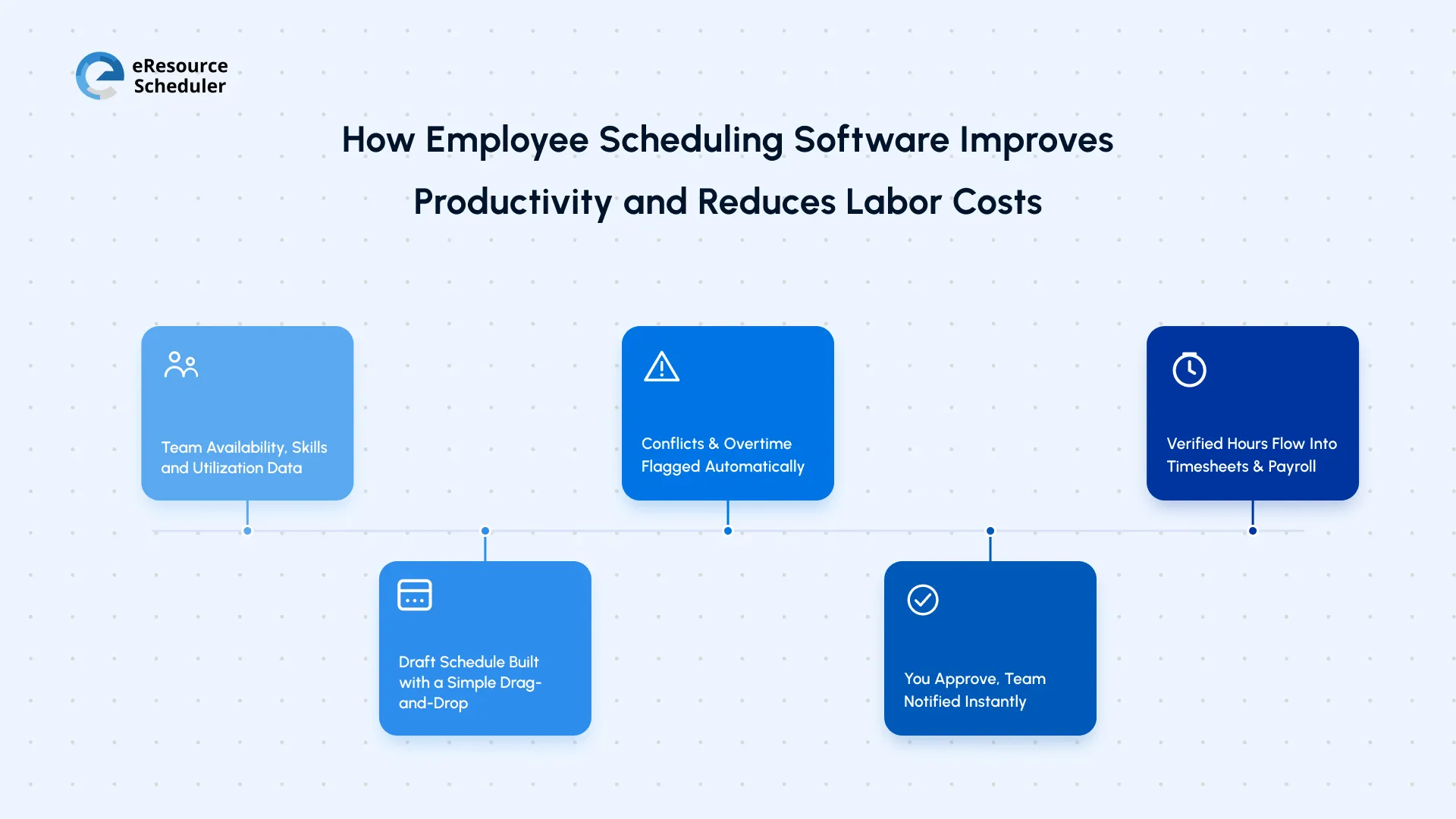
Nothing in this chain requires you to sit and manually reconcile spreadsheets against leave requests. Each step feeds the next one. The only place you actually step in is the approval stage. This is where you have a final say over anything the system builds.
This is the mechanics of the scheduling process. What actually matters is what this process means for your day-to-day life, and where the real payoff shows up.
This is the heart of why an employee scheduling and labor planning solution earns its place in your operations. Each piece solves a specific, recurring cost problem. Not just a scheduling inconvenience.
Overstaffing wastes money on hours nobody needed. Understaffing burns out the people who are there and quietly drags down service quality. The system keeps you in that narrow, suitable middle ground by matching headcount to actual demand. Shift by shift.
Unplanned overtime is one of the easiest costs to lose control of. It accumulates in small amounts that don’t feel urgent until the payroll bill arrives. Catching it early, before hours are logged instead of after, is one of the more direct ways in which shift scheduling for labor cost reduction plays out in practice.
You will know exactly how hours are being spent across shifts, teams, and projects. This kind of visibility connects directly to broader workforce planning. If you haven’t looked closely at where hours quietly disappear, untracked work hours cost more than most people realize.
When people know their schedule in advance, they can plan their lives around it. This predictability shows up in fewer last-minute call-outs and more consistent attendance. Which is a quieter but very tangible productivity win.
Nobody sticks around for chaotic, unpredictable scheduling. Wellingtone’s State of Project Management 2026 lists poor resource management amongst the most common operational challenges organizations report today. Unpredictable staffing is very often at the root of this. Fair, transparent scheduling directly addresses one of the unassuming reasons people walk out the door.
When hours sync automatically instead of being reentered by hand, payroll errors drop. This means fewer awkward conversations about missing pay and fewer hours consumed fixing mistakes that shouldn’t have happened in the first place.
Everyone can see their shifts, hours, and upcoming schedule without having to chase anyone down. This transparency alone removes a surprising amount of friction between managers and the people they schedule.
Taken together, these are not isolated perks. They are the actual reasons to use employee scheduling software instead of continuing to patch together a manual process. None of it works, though, if you end up picking the wrong tool for the job.
Not every system is built the same way. Shortlisting one shouldn’t come down to whichever tool your team stumbled across first.
Look for real-time overtime alerts, self-serve visibility for your team, and payroll integration without manual re-entry. If a tool cannot do these three things well, it is not going to save you the time it’s promising.
It also helps if the system fits into how you already manage people, not just how you schedule them. If performance tracking and staffing decisions live in completely different tools, you end up recreating the same disconnect you are trying to fix. Pairing scheduling with clear employee performance management closes this gap.
This is exactly the space eResource Scheduler, a resource scheduling software, was designed for. It handles overtime flagging and real-time visibility covered above. On top of this, it also connects to how you already plan resources and prioritize work.
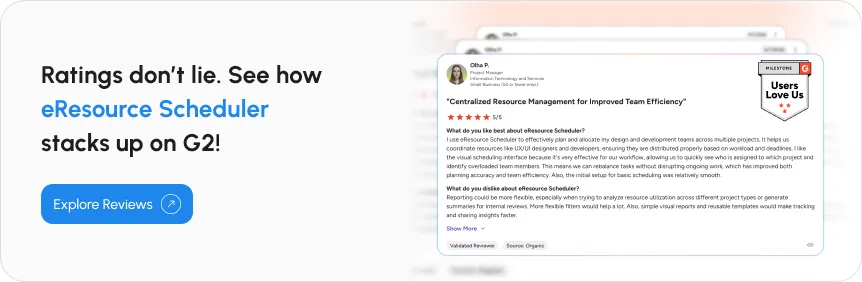
This matters most when staffing decisions and project deadlines are competing for the same hours. The same logic applies to headcount planning. If you are calculating FTE in a separate spreadsheet from your shift schedule, you are solving the same problem twice.
Picking the right system solves most of the problems covered so far. What’s worth sitting with is what happens if you keep putting off this decision.
Waiting on this decision doesn’t feel like a cost at the moment, which is exactly why it adds up unnoticed. Overtime creeps in quietly. Frustrated employees leave without saying exactly why. Managers spend hours each week on something that a system could handle in minutes. More importantly, none of this shows up as one clean line item you can point to.
Point to Remember
None of the above-discussed costs show up as an alarming number on a report. They show up as slightly higher overtime totals month over month. They show up as exit interviews nobody dug into deeper. They show up as the extra hour manager quietly loses every week, untangling a shift conflict. The pattern is what adds up. Not any single incident.
This is really the whole case for not treating this as a someday project. The tool you eventually pick is not a small operational upgrade. It is the thing standing between you and every cost listed above.
You started this blog thinking about a broken schedule. What it actually comes down to is this. Every hour spent patching rosters by hand is an hour not spent on the parts of your job that actually need you. Every quiet resignation over unfair shifts is a cost that never shows up as a line item. But it’s all real at the same time.
You don’t need to fix all of it this week. Pick the one cost that is hitting you the hardest right now. Be it overtime, turnover, or the hours lost rebuilding rosters by hand, and start there. If you are also rethinking how resources are allocated across your wider team, it’s worth pairing this with a broader look at resource management strategies with the same goal: ‘less time managing logistics, more time doing the work that actually matters.’
1. How long does it actually take to get employee scheduling software up and running?
Most teams are live within a week or two, not months. The bulk of the setup time goes into loading employee availability, skills, and any labor rules specific to your location, not into learning complicated new software. If your team is small, you can often be scheduling your very next shift cycle on the new system.
2. Does employee scheduling software work for remote or hybrid teams, or is it built for shift-based work only?
It works for both, just differently. For remote or hybrid teams, the focus shifts from shift coverage to tracking availability windows, time zones, and work hours logged against projects rather than physical shifts. The same core benefit applies either way: you get a clear, real-time picture of who's working when, without chasing people down to ask.
3. How does scheduling software handle labor law differences across states or regions?
Good scheduling platforms let you set location-specific rules, like overtime thresholds, mandatory break windows, or minor work-hour restrictions, so the system flags a violation before a shift goes live instead of after payroll runs. If your team spans multiple states or countries, this is one of the areas where automation genuinely outperforms a shared spreadsheet, since nobody has to memorize every regional rule by hand.
4. Will my team need training to start using the new scheduling software?
Not much. Most of the learning curve sits with whoever builds the schedule, not the people receiving it. Your team typically just needs to know how to check their shifts and request a swap or time off, both of which usually take less than five minutes to learn on a mobile app.
5. Is employee scheduling software worth it for a small team, or is it only useful at scale?
It's worth it earlier than most people assume. Even a team of ten people juggling shift swaps and availability by text message is losing hours every week to something a system could handle instantly. The time saved scales with your team size, but the relief from manual back-and-forth starts showing up almost immediately, regardless of how big you are.


Plan Smarter. Schedule Faster. For Free.
Join thousands already using eResource Scheduler to align teams, time, and tasks seamlessly.
 ALL FEATURES INCLUDED